Some days, you have the energy to make a plan, run the errands, and finally deal with that mysterious pile on the counter.
Other days, opening the planner feels like an accomplishment all by itself.
That is where the ADHD I’m Stuck Planner gives you a simple starting point. You do not have to fill in every section. You can choose the page that fits what you need today and leave the rest for another time.
Want a look inside? This PDF planner includes Start Here, Today, Reset, and Money pages, among other sections. Below, I’ll show you how you might use a few of them on a day when your energy is limited.
Start Here: Choose What You Need Right Now
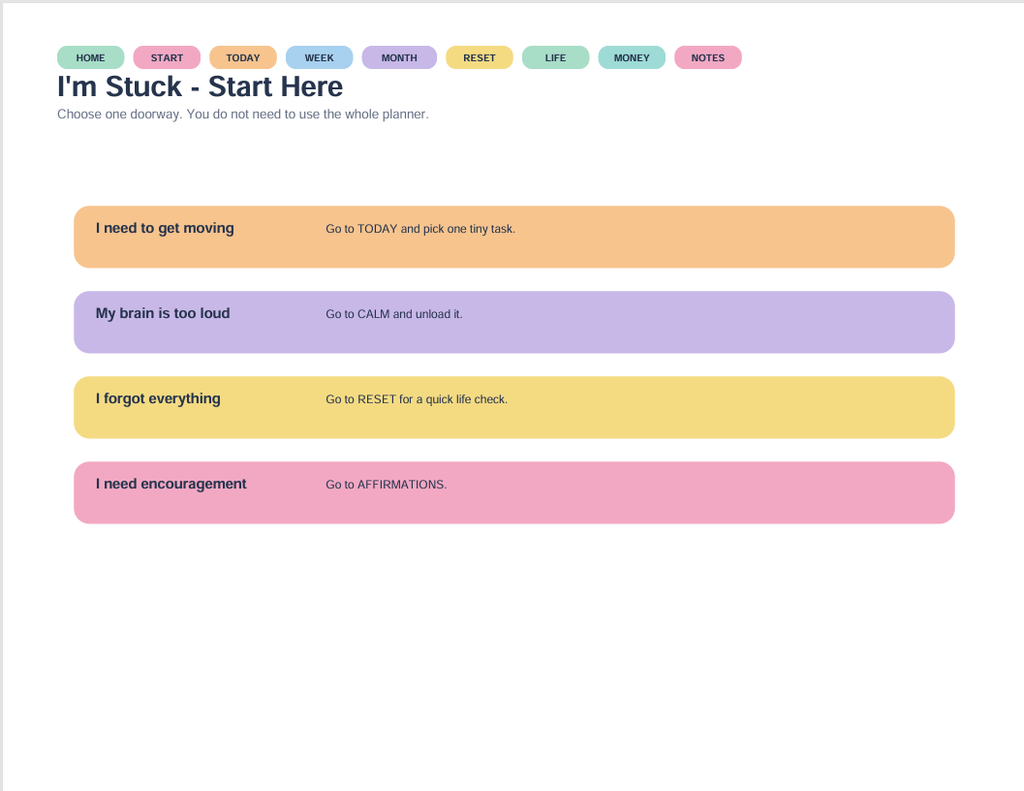
The Start Here page says, “Choose one doorway. You do not need to use the whole planner.”
It offers four starting points:
- I need to get moving: Go to Today and pick one tiny task.
- My brain is too loud: Go to Calm and unload it.
- I forgot everything: Go to Reset for a quick life check.
- I need encouragement: Go to Affirmations.
Instead of deciding how to organize your entire week, you can begin by asking which description fits right now.
Perhaps you need to check an appointment. Perhaps you just need somewhere to put the thoughts competing for your attention. Choose that starting point. The other pages can wait their turn.
Today: One Must-Do, With Room for More
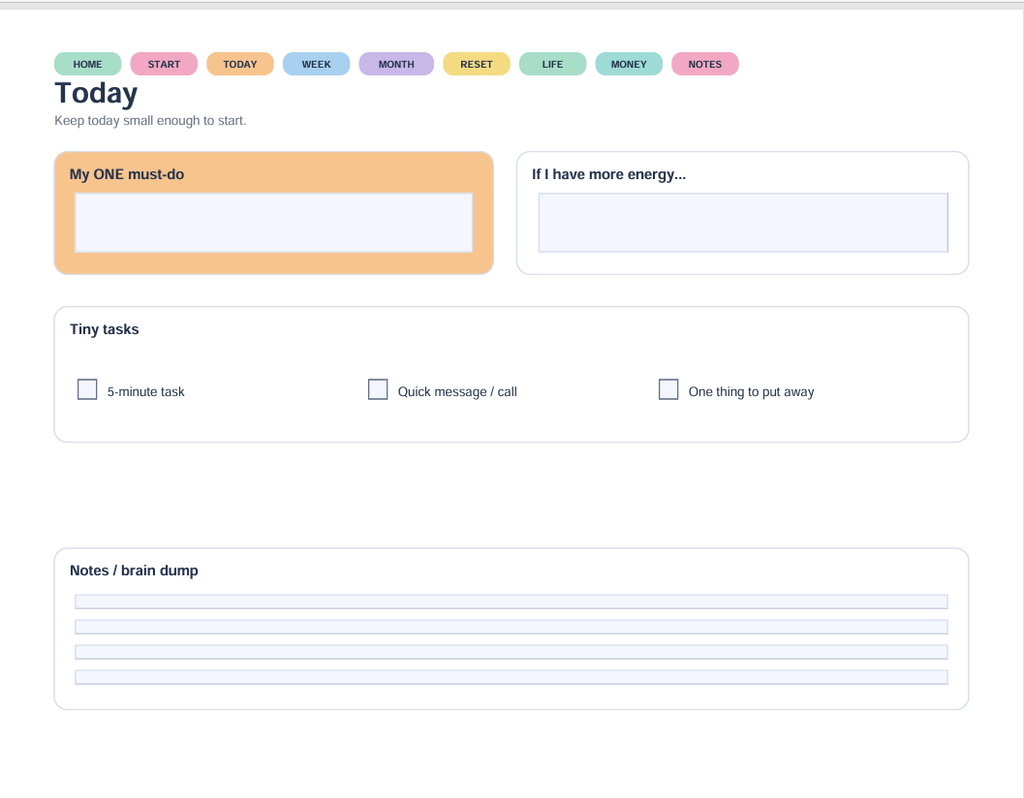
The Today page separates “My ONE must-do” from “If I have more energy…”
That second box is optional. It is not a sneaky assignment wearing a friendly hat.
For example, your one must-do might be checking when the electric bill is due. If you have more energy afterward, you could gather the rest of the week’s bills. You do not have to turn one quick check into an afternoon of paperwork.
There are also tiny-task checkboxes for a five-minute task, a quick message or call, and one thing to put away.
You might choose one of those as your starting point. Sending the message you have been putting off is a specific action. “Get my whole life together” is rather a lot to ask of a Tuesday.
Give Extra Thoughts Somewhere to Land
At the bottom of the Today page is a Notes / brain dump section.
You can use that space for the things that pop into your head while you are trying to do something else: buy batteries, return a call, find the permission slip, figure out why there are three opened jars of mustard.
Writing something here does not have to mean doing it today. It gives you a place to record it and come back to it.
Your brain dump does not need neat handwriting, matching colors, or a committee meeting. A few words can be enough to remind you what you meant.
Reset: Pick Just One Check
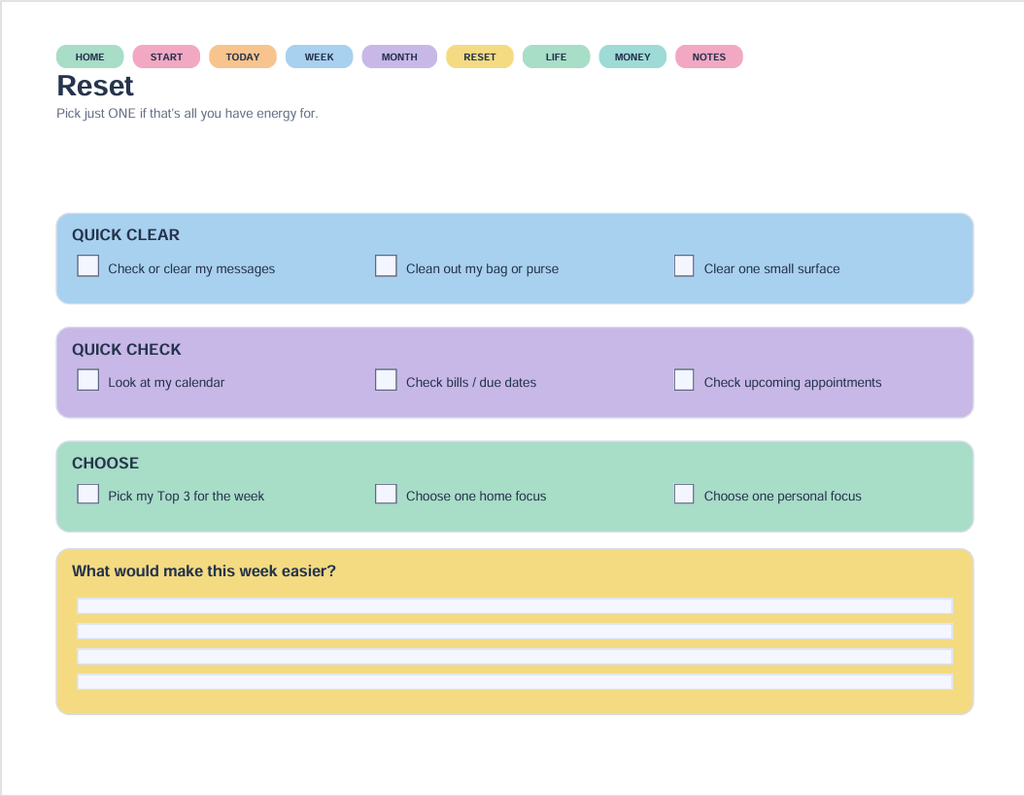
The Reset page begins with permission to pick just one item if that is all you have energy for.
Its prompts include checking your calendar, reviewing bills and due dates, checking upcoming appointments, or clearing one small surface. There is also space to answer, “What would make this week easier?”
On a low-energy day, you could choose to check tomorrow’s appointment time and stop there. You have used the page without completing every checkbox.
And if you choose to clear a small surface, one corner of the counter counts. The planner did not secretly say “renovate the kitchen.”
A Simple Example to Try
Here is one way to use the planner without making a big project of it:
- Open Start Here and choose “I need to get moving.”
- On Today, write one specific action in My ONE must-do.
- Record any unrelated reminders in Notes / brain dump.
- Leave If I have more energy blank unless you want to add something.
That is a complete way to begin. You can explore the other sections when they are useful to you.
💡 Tech Tip: Download the PDF before filling it in. Open it in a PDF reader that supports fillable forms, and save your changes. Close and reopen your saved copy to check that your entries are still there.
Take a Look Before You Decide
If you would like to see more, take a look at the ADHD I’m Stuck Planner and decide whether its layout fits the way you prefer to plan. It is an organizational tool with space for one priority, extra thoughts, and everyday checks.
Explore the ADHD I’m Stuck Planner.
For more simple planning ideas, read ADHD Planning: When Your Brain Has 27 Tabs Open.
You do not have to fill every box. Start with the part that is useful today.